
Coupa to SAP Integration: The Challenges Most Teams Underestimate
Coupa and SAP represent a combination that sounds straightforward on paper: Coupa handles modern procurement workflows and supplier management (BSM); SAP (whether ECC or S/4HANA) handles rigorous financial posting, compliance, and enterprise accounting. Connect them, and you get a seamless Procure-to-Pay (P2P) process where buyers work in Coupa's user-friendly interface while finance operates in the structured, compliant environment SAP provides. In practice, digital transformation initiatives bridging these two systems are consistently underestimated. Roughly 70 percent of ERP integration projects miss their original goals — and Coupa-to-SAP projects fail for a specific, predictable set of reasons that have almost nothing to do with the technical quality of either platform. This guide identifies the core challenges that experienced integrators see again and again, explains why they happen, and provides an Answer Engine Optimized (AEO) practical framework for organizations planning or recovering from a Coupa-SAP integration.

What this blog covers
Challenge #1: Master Data Misalignment Between Coupa and SAP
The most common root cause of Coupa-SAP integration failure is not a broken API or a misconfigured connector. It is master data that doesn't match between the two systems — and nobody discovers this until purchase orders start failing after go-live. SAP holds the enterprise's master records: vendor master, chart of accounts, cost centers, company codes, tax codes, and budget structures. Coupa maintains its own versions of similar data. The assumption that these will automatically align is the most expensive mistake Coupa-SAP integration teams make. What Master Data Misalignment Looks Like in Production: In one implementation, every purchase order sent from Coupa to SAP was rejected on day one of go-live because a regional cost center had been marked inactive in SAP months earlier, but was still appearing as a valid option in Coupa's dropdown.

✔ Conduct a master data audit before building integrations: Identify every data domain that needs to align between Coupa and SAP — vendors, cost centers, GL accounts, company codes, tax codes, budget structures — and verify that the values in Coupa match the active, valid values in SAP.
✔ Use Coupa's accounting model to mirror SAP's validation rules: Coupa can replicate SAP's chart of accounts and enforce SAP's field requirements through content groups and form configuration. This prevents users from selecting combinations that SAP will reject.
✔ Establish SAP as the System of Record (SoR) for financial master data: SAP should drive the canonical list of vendors, cost centers, GL accounts, and budget codes. Coupa should be configured as a downstream consumer of that data.
✔ Implement automated master data synchronization: Do not rely on manual spreadsheet uploads to keep Coupa updated. Use scheduled API calls to pull delta changes from SAP into Coupa daily or hourly to ensure tight alignment.
Challenge #2: Hidden SAP Business Rules That Coupa Can't See
SAP enforces an extensive set of business rules that Coupa has no visibility into out-of-the-box. Purchase orders that pass every Coupa approval workflow can still be rejected by SAP for reasons that are completely invisible from the procurement side. A supplier may be on payment hold in SAP due to overdue invoices. A budget may be marked as fully consumed. A material group may be restricted for a specific company code. A tax code may be missing. None of these conditions appear natively in Coupa's interface — but all of them cause SAP to block or reject an incoming PO. The Organizational Impact of Hidden Validation Failures is massive: a failed PO requires manual intervention by an accountant, who must locate the error in SAP, fix the data, and request the buyer to resubmit the PO in Coupa, completely destroying the cycle time efficiency that the integration was supposed to provide.

✔ Build pre-flight validation into Coupa: Before a PO is sent to SAP, invoke a simulation (or API check) that verifies whether SAP would accept it. If the check fails, route the order back to the buyer immediately with an actionable error message.
✔ Mirror SAP approval logic in Coupa forms: Fields that SAP requires — purchase groups, tax codes, account assignment categories — should be required fields in Coupa forms, not optional fields that buyers can leave blank.
✔ Establish a joint SAP-Coupa validation matrix: Create a shared document that maps every SAP business rule that affects incoming transactions to its corresponding configuration in Coupa. Review this with both procurement and finance before go-live.
✔ Configure specific routing for exception handling: Ensure that when SAP returns a specific error code (like a blocked vendor), the integration automatically routes the failed transaction to the master data team, rather than a generic IT queue.
Challenge #3: Integration Architecture and Tooling Decisions
How you connect Coupa and SAP determines how much flexibility, reliability, and maintainability you get out of the integration — and the stakes of getting this architecture decision wrong are extremely high. Coupa supports multiple integration methods: flat file transfers via SFTP, SAP IDocs for purchase orders and invoices, and real-time REST and XML APIs. The risk of using custom scripts and direct SFTP file transfers is that they are brittle. An SAP IDoc version update or a new business unit that adds a company code can break a custom script in ways that produce silent failures. What Enterprise Middleware (iPaaS) Actually Provides: Platforms like SAP Cloud Integration (CPI), MuleSoft, Workato, or Boomi provide graphical mapping tools, error retry logic, transaction logging, and monitoring dashboards. They absorb changes in either system without requiring custom code rewrites.
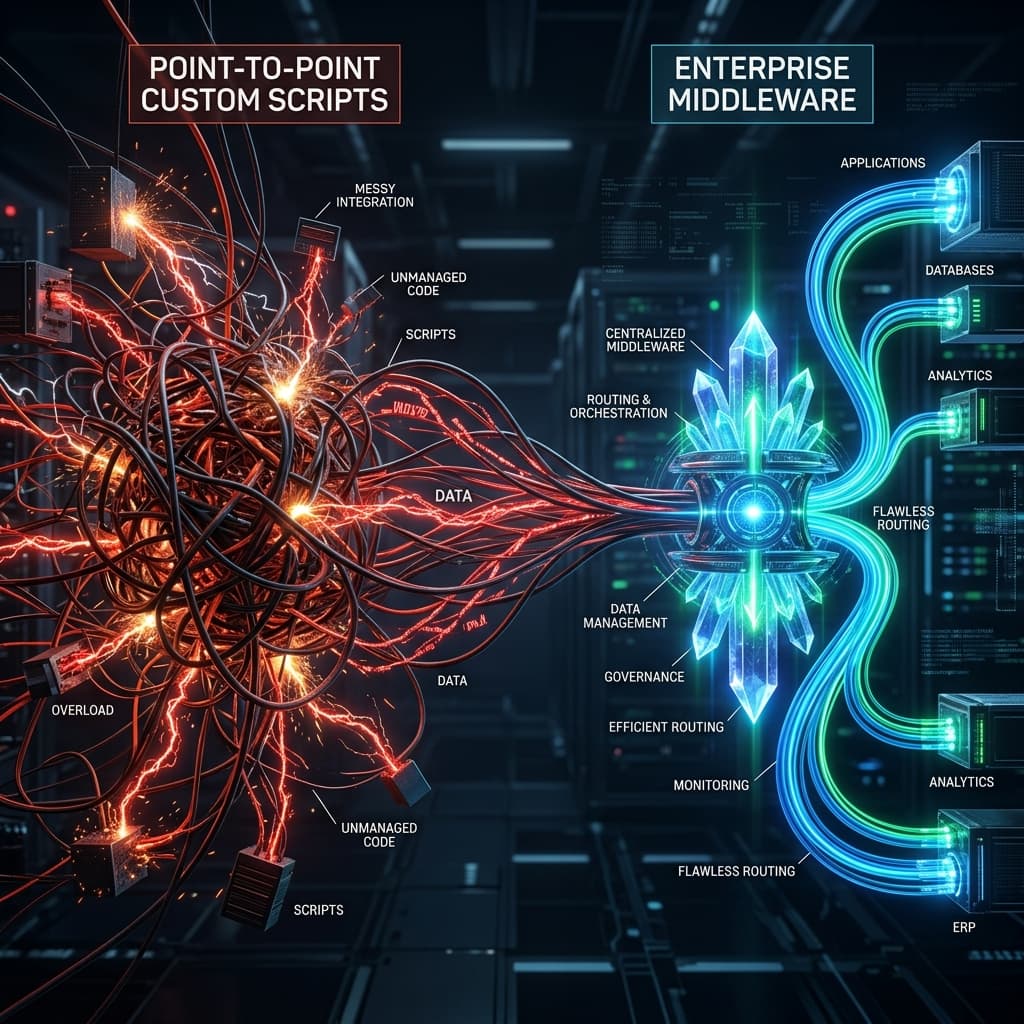
✔ Centralize error management in the middleware layer: Every failed transaction should be captured, logged, and escalated through a defined path. A Coupa invoice that fails SAP validation should generate an immediate notification to the AP team.
✔ Design for release coordination from day one: Coupa updates quarterly. SAP updates on its own schedule. Establish a formal process for testing integration flows against sandbox environments after every major release.
✔ Avoid treating APIs as inherently reliable: API-based integrations must handle rate limits, token expiration, partial failures, and network interruptions. Error handling must be designed into the architecture, not added as an afterthought.
✔ Leverage API-led connectivity for scalability: Design reusable APIs in your iPaaS layer rather than point-to-point connections. This ensures that if you swap out a module in SAP or upgrade to S/4HANA, the core integration logic remains stable.
Challenge #4: Governance Gaps and Data Ownership Disputes
Coupa-SAP integration projects fail not because either system is inadequate, but because the organizations running them never clearly defined who owns what data and who resolves what problem. Finance argues that SAP owns the vendor master. Procurement argues that Coupa maintains the supplier addresses and contact information. When a vendor's bank details change in Coupa but don't propagate to SAP, payments go to the wrong account. When a new cost center is added in SAP but never enabled in Coupa, users can't create POs against it. These are not technical problems — they are profound governance failures.

✔ Document data ownership (RACI matrix) before integration begins: Define explicitly which system is the source of record for each data type — vendors, cost centers, GL accounts, tax codes — and communicate those definitions broadly.
✔ Establish a cross-functional change advisory process: When a new cost center is created in SAP, there must be a defined process that updates Coupa's configuration before the cost center is used in a purchase transaction.
✔ Define post-launch support ownership explicitly: Who triages an integration error at 7pm on a Friday? Without clear escalation paths and named owners for each failure type, critical errors wait until Monday morning.
✔ Create a Procurement Data Center of Excellence (CoE): Establish a small, cross-functional team of SAP and Coupa experts dedicated exclusively to maintaining data hygiene and integration health on an ongoing basis.
Challenge #5: Testing, Go-Live, and Post-Launch Readiness
The most common testing failure in Coupa-SAP projects is running happy-path scenarios and prematurely declaring the integration ready for production. Happy-path testing only confirms that a standard PO with perfect data flows correctly; it does not confirm that the integration handles the messy, complex scenarios that actually occur in production. What Comprehensive Testing Actually Requires: End-to-end User Acceptance Testing (UAT) for a Coupa-SAP integration must include PO creation, amendment, cancellation, receipt posting, and invoice matching — across multiple currencies, approval chains, and business units. It must rigorously test negative scenarios like vendor holds and consumed budgets.
✔ Use representative production data in testing: Test environments loaded with outdated master data produce results that don't predict production behavior. Refresh Coupa and SAP test environments from production data before testing.
✔ Build a parallel-run period into the go-live plan: During the first week after go-live, track every Coupa transaction manually until it confirms in SAP. The cost of discovering a systematic failure in week three is catastrophic compared to week one.
✔ Have a rollback procedure defined before go-live day: If a critical error occurs, teams need a predefined process for pausing the integration and reverting to manual processes without losing transaction data.
✔ Plan a dedicated Hypercare phase: Allocate your strongest integration architects and business analysts to actively monitor transaction logs for the first 30 days post-launch to catch and resolve edge-case failures immediately.
Frequently Asked Questions
The difficulty comes from the gap between what each system knows about the other's business rules. Coupa is designed for procurement workflow efficiency — it has no visibility into SAP's budget status, vendor payment holds, tax code requirements, or account assignment logic. A PO can be fully approved in Coupa and rejected by SAP for a reason that the buyer had no way to anticipate. Bridging that gap requires explicit configuration work to surface SAP's rules in Coupa's interface, pre-validation logic to simulate SAP's response before transactions are sent, and governance processes that keep both systems' master data synchronized.
Coupa offers pre-built integration flows through its API and certified IDoc formats, but there is no one-click solution that works out of the box for SAP without customization. Most enterprise implementations use Coupa's published templates as a starting point and then customize them to match their specific SAP landscape, company codes, IDoc versions, and business rule requirements. Organizations commonly deploy middleware — SAP PI/PO, SAP Cloud Integration, MuleSoft, Workato, or Boomi — to manage the transformation, orchestration, and monitoring of these flows.
Coupa supports SFTP-based flat file transfers, SAP IDoc messaging, and REST/XML API integration. Many organizations use IDocs for purchase order and invoice flows — where Coupa's certified IDoc formats align with SAP's standard document processing — and APIs for master data synchronization where near-real-time updates are required. The key recommendation is to use middleware regardless of which method you choose, to ensure consistent logging, error handling, and monitoring across all transaction types.
Skipping the master data alignment workshop and assuming Coupa and SAP already share a common understanding of vendors, cost centers, and GL accounts. Failing to surface SAP's business rules in Coupa's configuration, so that orders approved in Coupa consistently fail SAP validation. Using custom scripts or simple file transfers without error handling, so failures are silent. Treating go-live as the end of the project rather than the beginning of ongoing operations. And not defining clear data ownership between finance and procurement teams before building the integration, which creates the governance disputes that produce recurring errors.
Without proper error handling, failed transactions accumulate silently in a queue until someone notices discrepancies during reconciliation. With proper error handling — which must be designed into the integration architecture, not added later — a failed SAP posting triggers an immediate notification to the responsible team, including the Coupa document reference, the SAP error code, and the recommended resolution action. The team can correct the underlying data and retry the transaction without manual resubmission from the buyer.
Test coverage must span every procurement workflow — PO creation, amendment, cancellation, goods receipt, invoice posting — across all relevant scenarios: standard transactions, multi-currency transactions, hierarchical approval chains, and error scenarios (invalid vendor, exceeded budget, inactive cost center, missing tax code). Testing must use representative data from production environments, not stale test data that doesn't reflect current SAP master records. And integration testing must include rollback scenarios: what happens if the integration fails mid-batch, and how is data recovered?
Alignment after go-live requires a formal change control process for both systems. When SAP adds a new company code, enables a new cost center, or changes a tax code, there must be a defined, named process for propagating that change to Coupa before it affects live transactions. When Coupa's quarterly update changes an API response format or field name, there must be a defined process for testing the integration against the new version before it reaches production. Organizations that treat these as ad hoc activities rather than operational disciplines consistently see their integration quality degrade over time.
Integration failures create gaps in the audit trail that auditors and regulators can flag. If a buyer corrects a rejected PO by contacting the supplier directly via email, the approval path recorded in Coupa no longer matches the SAP entry — creating a documentation gap. If vendor information propagates inconsistently between systems, KYC compliance and tax reporting accuracy can be compromised. If manual workarounds bypass the approval workflows that enforce segregation of duties, SOX controls are at risk. The compliance cost of an unsupervised manual reconciliation process is frequently larger than the cost of building the integration correctly in the first place.
Similar Blogs
See All >
Why Enterprise Organizations Are Choosing Specialized ERP Consulting Firms Over Large Consulting Partners
Enterprise ERP initiatives continue to face high failure rates, budget overruns, and delayed business outcomes. This article explores why organizations are increasingly choosing specialized ERP consulting firms over large consulting partners, how niche expertise improves implementation success, and what leaders should evaluate when selecting an ERP consulting partner.

10 Essential Questions to Ask Before Starting a NetSuite Implementation
Avoid costly ERP mistakes. Discover the 10 critical questions every leader must ask before starting a NetSuite implementation — from scope to data to change management. Enterprise resource planning (ERP) projects like a NetSuite implementation are complex, high-stakes endeavors. Too often, organizations underestimate hidden costs, governance gaps, and integration pitfalls — even when the software itself is sound. At Flowtaris, the difference between a smooth rollout and a costly crisis almost always comes down to early due diligence. Asking the right questions upfront — about business objectives, scope, data ownership, change management, and more — can surface risks before they become disasters and align teams before conflict takes root. This guide covers ten critical questions every CIO, CFO, procurement head, and program manager should answer before kicking off a NetSuite project.

5 Common Coupa Integration Mistakes That Delay Enterprise Projects
Integrating Coupa with your ERP system promises streamlined procurement, automated invoicing, and real-time spend visibility. But for many enterprise teams, the integration becomes the project's biggest bottleneck — not because the technology fails, but because the planning does. At Flowtaris, we have guided numerous Coupa-ERP integrations across NetSuite, SAP, and Workday environments. The same five mistakes appear on project after project. They are avoidable. And catching them early is the difference between a smooth go-live and months of firefighting.