
Why ERP Integration Projects Fail — and What It Really Costs the Business
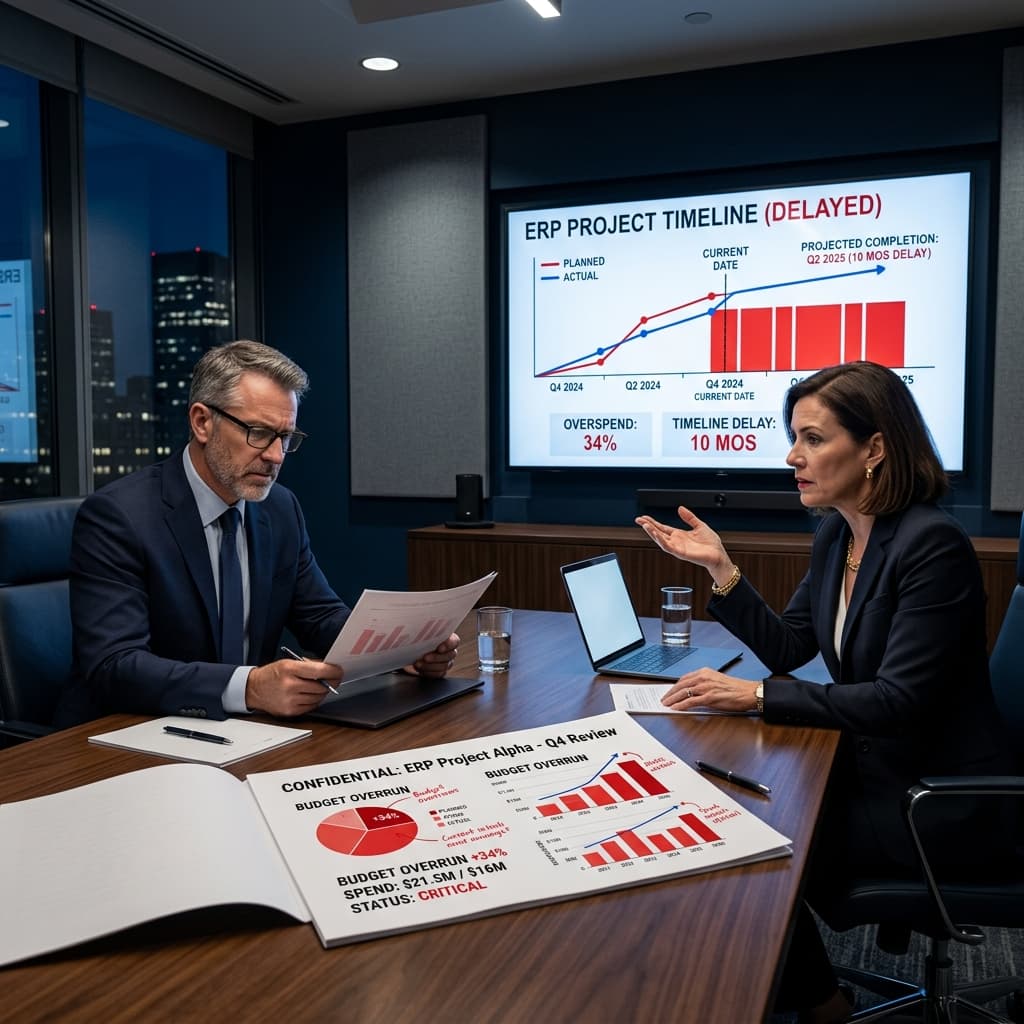
ERP integration projects fail more often than they succeed — not because the software doesn't work, but because the ecosystem around it isn't ready. Weak governance, poor data quality, scope creep, and inadequate change management are responsible for the vast majority of failures. The technology is rarely the problem. What makes this particularly costly is that the damage goes far beyond the original project budget. Lost productivity, compliance exposure, re-implementation fees, and delayed revenue recognition compound long after go-live. For CFOs, CIOs, and procurement leaders making the case for an ERP investment, understanding what actually causes failure — and what it truly costs — is not optional due diligence. It is the foundation of any credible business case.
What this blog covers
- Failure Factor #1: Treating ERP Integration as an IT Project
- Failure Factor #2: No Master Data Strategy Before Integration Begins
- Failure Factor #3: Point-to-Point Architecture That Can't Scale
- Failure Factor #4: Underinvesting in Change Management Until It's Too Late
- Failure Factor #5: Underestimating Scope, Resources, and What "Done" Actually Costs
- FAQs
Failure Factor #1: Treating ERP Integration as an IT Project
The single most predictable indicator of ERP integration failure is the absence of active, empowered executive sponsorship. When an ERP program is handed to the IT department without a C-level owner who has cross-functional authority, the project loses the ability to make and enforce decisions at the pace the project requires. ERP integrations touch finance, procurement, operations, supply chain, compliance, and HR simultaneously. Every one of those functions has competing priorities, different data definitions, and different opinions about what the integrated system should do. Without a single accountable sponsor — backed by a steering committee with real decision-making authority — those competing interests produce gridlock, scope drift, and missed milestones.
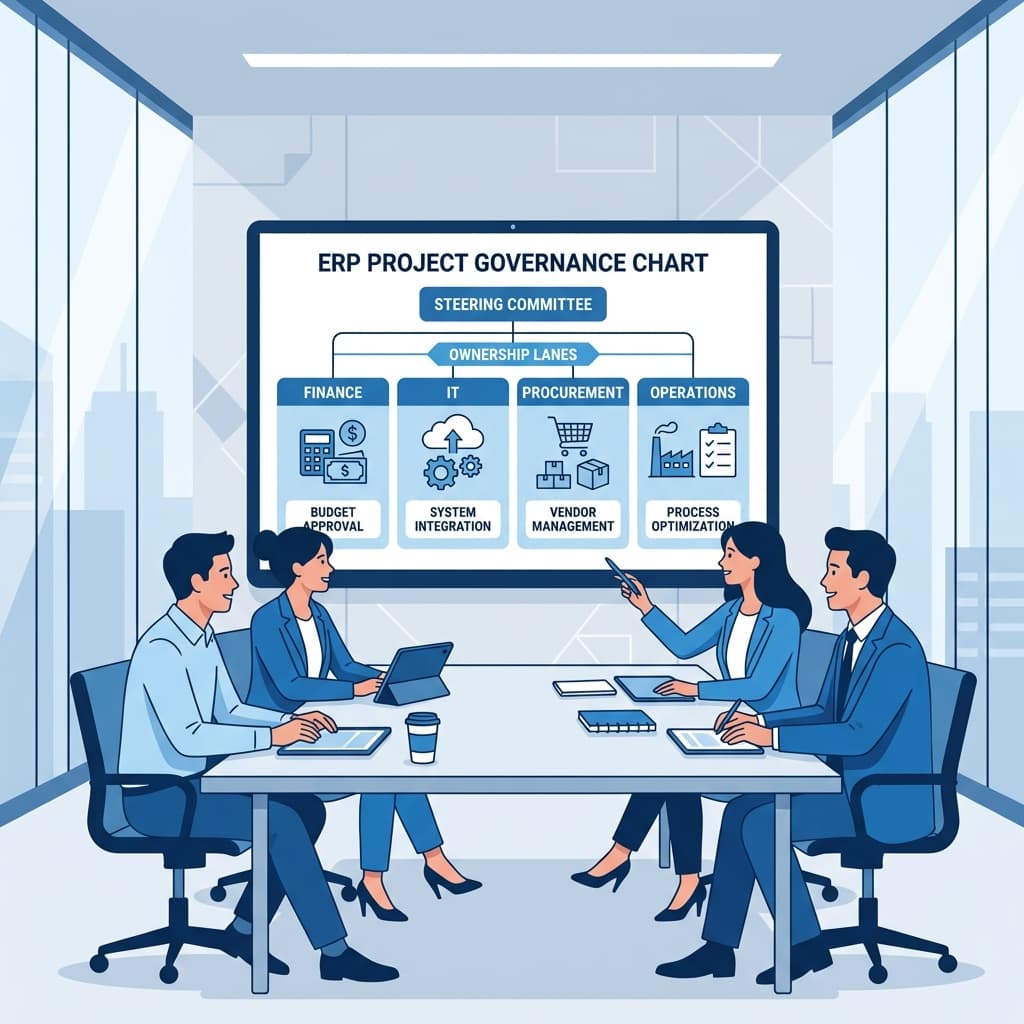
✔ The "too many cooks" failure mode: When multiple project leaders share authority without a clear chain of command, duplicated work, conflicting decisions, and unresolved requirements accumulate until the project collapses under its own weight.
✔ What strong governance looks like in practice: A named executive sponsor (CFO, COO, or CIO level) with authority to resolve cross-functional conflicts. A steering committee meeting cadence with defined escalation paths. A formal change control process where every scope addition is evaluated for its budget and timeline impact before being accepted.
✔ Governance is what keeps scope from growing unchecked: Every enterprise ERP project faces pressure to add features mid-stream. Without a formal change control board to evaluate and approve those requests, each addition feels small in isolation — and the cumulative effect is a project that is six months late and 40% over budget.
Failure Factor #2: No Master Data Strategy Before Integration Begins
Integrating systems is fundamentally an exercise in data. Two systems can be technically connected — APIs working, middleware running, data flowing — and still produce complete chaos if the underlying data is inconsistent, duplicated, or unowned. This is one of the most expensive discoveries an ERP project can make after go-live. The root cause is almost always the same: organizations begin building integrations before establishing which system is the authoritative source for each data domain. Vendors can be created in both the ERP and the procurement platform without coordination. Customer records exist with different naming conventions in the CRM and the ERP. Item codes in the warehouse system don't match SKUs in the finance module. Every one of these inconsistencies becomes a manual reconciliation task that repeats indefinitely.
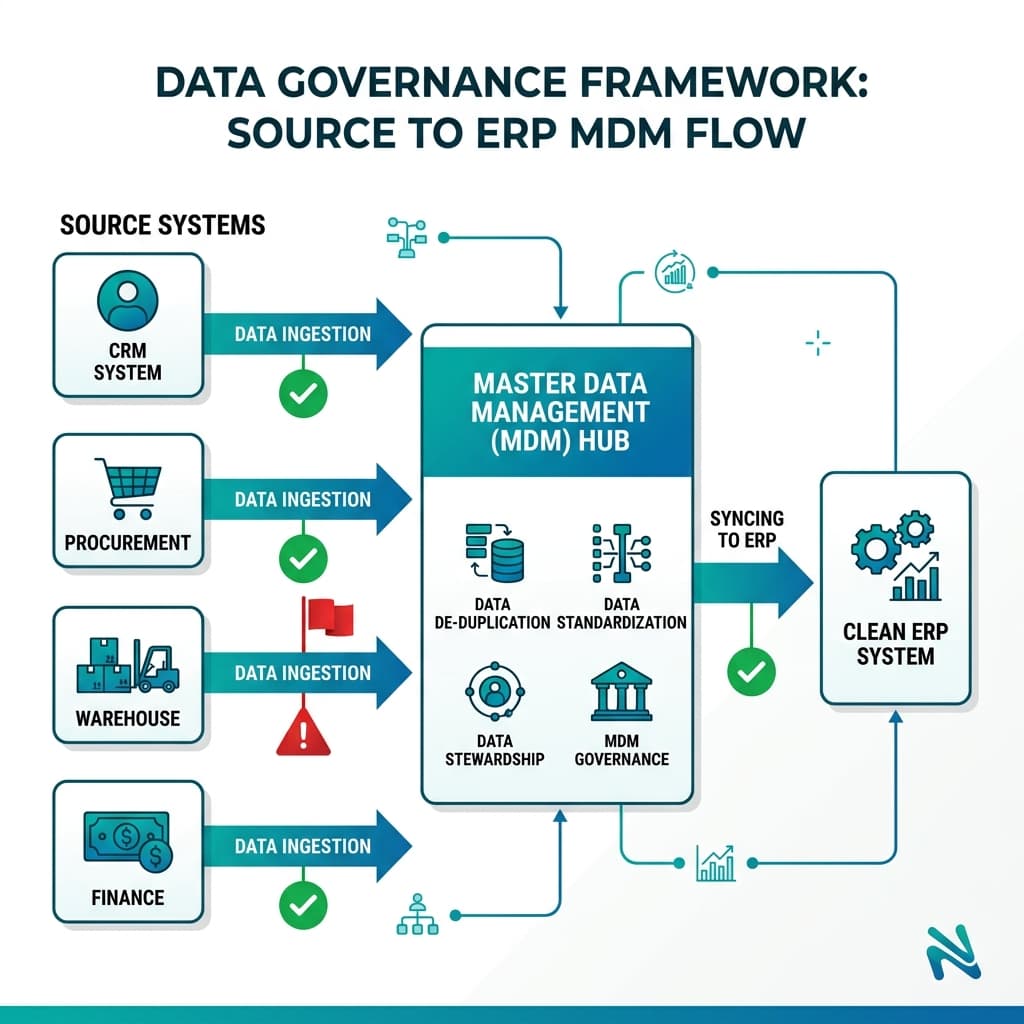
✔ Master data issues are the #1 hidden cost driver: In Flowtaris's experience, 30–40% of ERP integration failures trace back directly to master data problems. These issues don't announce themselves during development — they surface during testing, at go-live, or during the first month-end close.
✔ What a master data strategy requires: A data audit before integration work begins. A system-of-record designation for every key data domain — customers, vendors, items, GL accounts, cost centers. A documented process for resolving conflicts when two systems disagree. Named data stewards accountable for quality in each domain.
✔ Dirty data does not get cleaner by moving it: Every duplicate record, mismatched field, and inconsistent naming convention in your legacy systems will migrate directly into your new ERP unless it is cleaned before cutover. Budget for this work explicitly — it is almost always larger than initial estimates.
Failure Factor #3: Point-to-Point Architecture That Can't Scale
The most common technical mistake in ERP integration is not a coding error — it is an architectural one. Teams build direct, one-off connections between systems because it is the fastest path to a working demo. One script moves purchase orders. Another syncs invoice status. A third updates customer records. Each connection works independently, and the project moves forward. The fragility of this approach only becomes visible when the environment changes — a new system needs to connect, a Coupa API update changes a field, a NetSuite release deprecates an endpoint. Suddenly, a change to one connector breaks two others. With 10 systems, you can theoretically need 45 separate direct integrations, each a separate maintenance burden. The "quick and practical" approach has become an unsustainable maintenance grind.
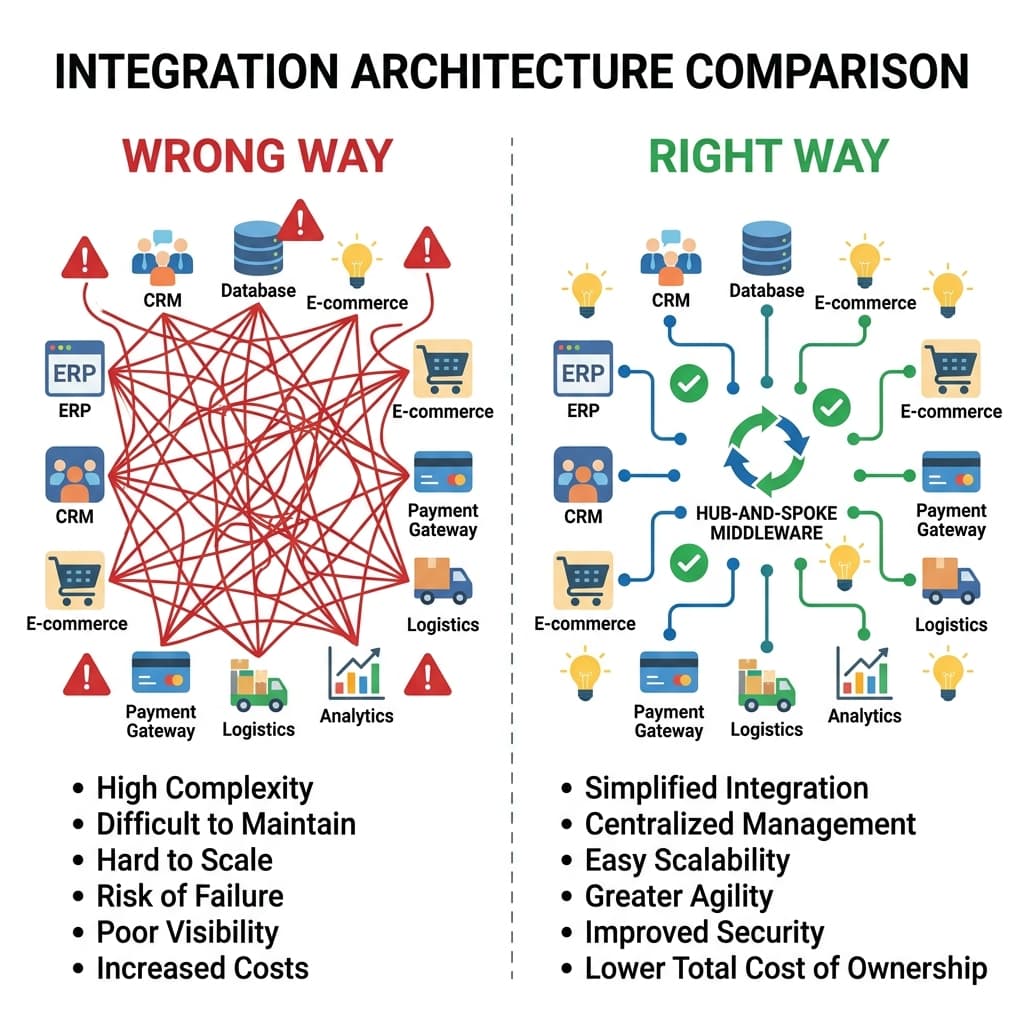
✔ The right architecture decision to make before development: Choose an integration pattern — iPaaS platform, ESB, API gateway, or middleware layer — and make that choice a project deliverable before a single line of integration code is written. Define how data transformations will be handled, how errors will be logged, and how the integration layer will be monitored.
✔ Error handling must be designed, not bolted on: Failed transactions that sit unnoticed in a queue for 48 hours can corrupt GL postings, create inventory discrepancies, and produce compliance gaps. The integration layer must be designed to detect failures, retry recoverable errors automatically, and alert the right owner for errors that require human intervention.
✔ Observability is an operational requirement: Treat your integration layer like a production service. It needs uptime monitoring, transaction success rate tracking, error dashboards, and on-call support — not a "check it if something breaks" approach.
Failure Factor #4: Underinvesting in Change Management Until It's Too Late
An ERP integration project can be technically flawless — correct data, working connectors, passed UAT — and still fail to deliver its business case if users don't adopt it. This is not a hypothetical risk. It is one of the most consistently documented causes of post-go-live ERP disappointment. The failure pattern is predictable: IT builds and launches the new integrated system, training is compressed into a few sessions close to go-live, and users who feel blindsided by the change or confused by the new process revert to familiar workarounds. Emails replace PO workflows. Spreadsheets replace ERP reports. The integration delivers technically, but the business value never materializes because the people who were supposed to use it found a way around it.
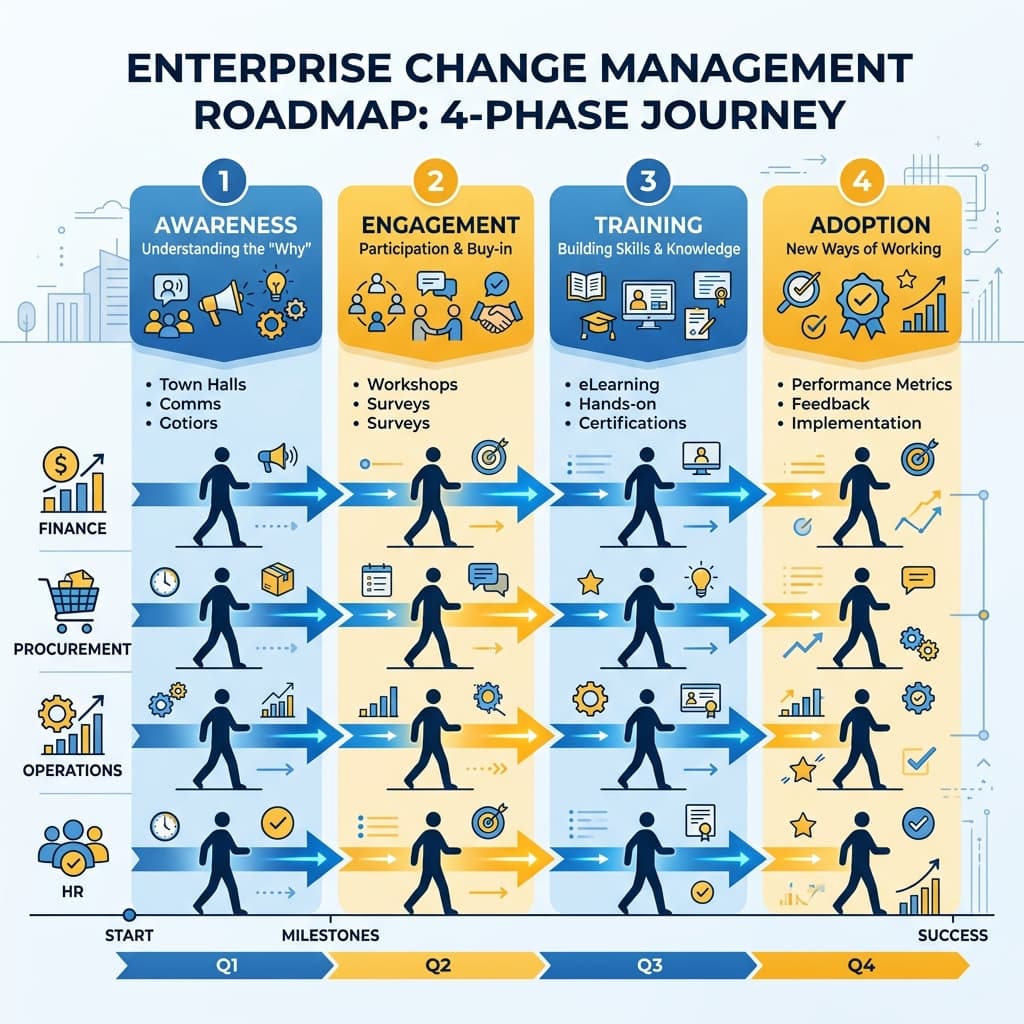
✔ Change management starts at project kickoff, not one month before go-live: Stakeholder engagement, process communication, and user champion identification should begin during design — not during testing. Users who are involved in shaping the system are far more likely to trust and use it.
✔ Training is an ongoing program, not a one-time event: Initial training sessions get users through go-live. Refresher sessions, role-based job aids, and a dedicated hyper-care support period in the first four weeks post-launch are what sustain adoption as users encounter real scenarios the training didn't cover.
✔ Measure adoption explicitly: Track what percentage of orders, invoices, and approvals are flowing through the new system versus legacy workarounds. If adoption metrics lag, that is a signal to intervene — not a problem to wait out.
Failure Factor #5: Underestimating Scope, Resources, and What "Done" Actually Costs
ERP integrations routinely cost nearly twice what was originally budgeted — not because vendors overcharge, but because organizations underestimate what the project actually involves. The average ERP project runs 189% over budget. In discrete manufacturing environments, that figure rises to 215%. These are not outliers. They are the statistical norm. The gap between planned and actual cost comes from predictable sources: scope that expands without formal change control, data cleanup work that was never budgeted because nobody audited the data before the project started, consultant fees that escalate when internal staff can't give the project the time it requires, and post-go-live support needs that were assumed to be minimal and turned out to be significant.
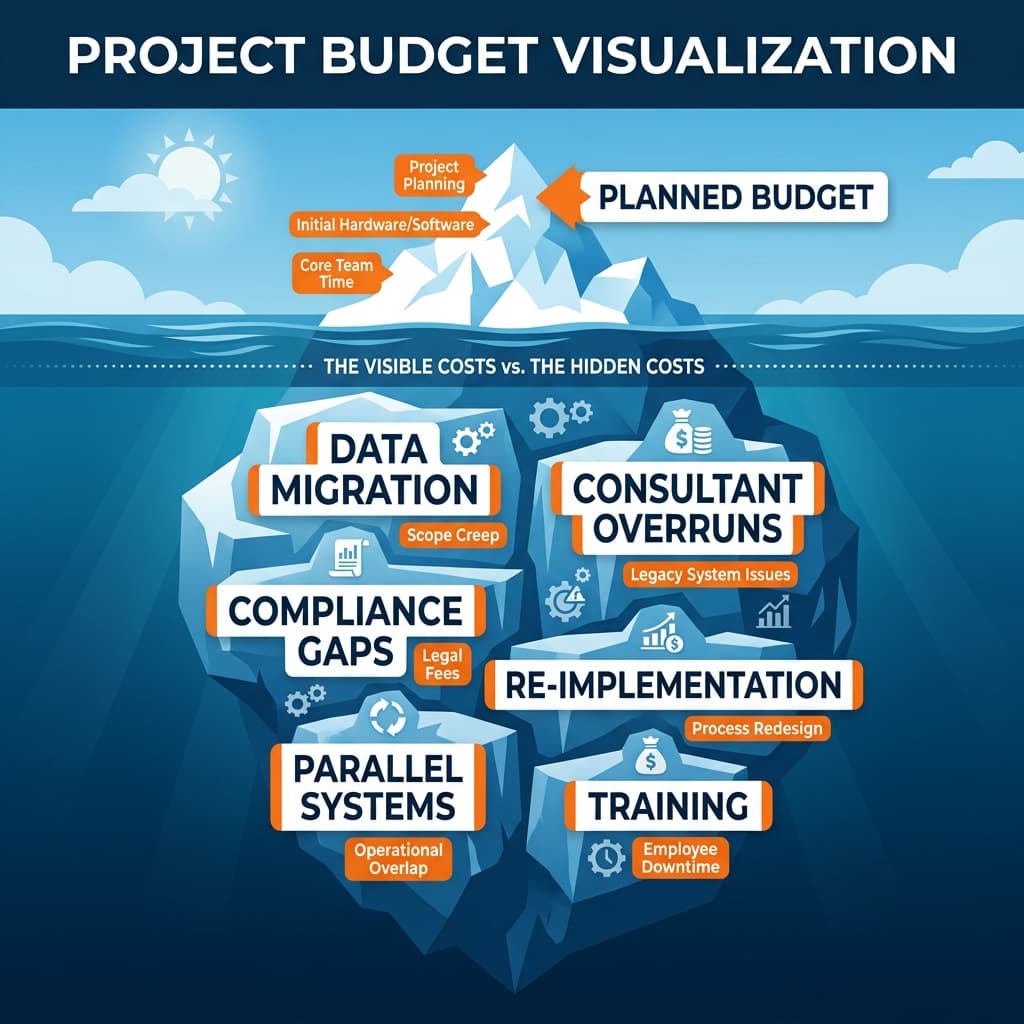
✔ Budget for what integration actually costs, not what you hope it costs: At minimum, reserve 20–25% of total project budget as contingency for scope changes, data issues, and integration rework. This is not pessimism — it is the industry-standard recommendation from every major ERP research firm and it is consistently ignored by teams that later run out of money.
✔ Scope creep is a governance problem, not a requirements problem: Every feature request that bypasses formal change control — however small it seems in isolation — consumes testing time, development resources, and integration rework that was not in the plan. The cumulative effect of unchecked scope changes is what turns a 6-month project into an 18-month one.
✔ Hidden costs that must be explicitly budgeted: Data migration labor and tooling. Integration middleware licensing. Custom development and regression testing after every system update. Post-go-live NetSuite or SAP administrator headcount. Business analyst time (a real cost even when internal). Compliance and regulatory consulting for multi-entity or multi-country environments.
Frequently Asked Questions
ERP integration projects fail primarily because of organizational and process breakdowns, not software defects. The most common causes are weak or absent executive sponsorship, poorly defined data ownership that produces inconsistent master data across systems, scope creep driven by unchecked change requests, underinvestment in user training and change management, and integration architectures that were built for the initial launch but cannot withstand system updates or business growth. Gartner research consistently shows that over 70% of ERP initiatives miss their original objectives — and in the vast majority of cases, the root cause is human and procedural, not technical.
The financial impact of a failed ERP integration extends well beyond the original project budget. Industry benchmarks show that ERP projects run an average of 189% over budget — meaning a planned $10 million project typically costs closer to $29 million before it stabilizes. Direct overruns come from extended consulting fees, emergency support, scope changes, and parallel operation of legacy systems during delays. Indirect costs include lost productivity while employees navigate broken processes, revenue impact from delayed order fulfillment or invoicing, potential compliance fines from audit trail gaps, and — in worst-case scenarios — the full cost of re-implementation on a new platform.
The most damaging ERP integration mistakes, in order of frequency, are: treating ERP as an IT project rather than a cross-enterprise business transformation; neglecting master data governance so that source-of-truth conflicts persist across systems; allowing uncontrolled scope changes without formal change management; underinvesting in user training and adoption planning; and building point-to-point integration architecture that cannot scale or survive system updates. Each of these mistakes is preventable with proper planning, and each one — left unaddressed — directly drives the cost overruns and timeline delays that characterize most failed ERP programs.
CFOs play a critical governance role in ERP integration success. The most impactful actions are: requiring a clearly defined business case with measurable outcomes before project approval; mandating a realistic budget that includes a 20–25% contingency for scope changes and data cleanup; establishing a cross-functional steering committee with authority to resolve conflicts and approve scope changes; and tracking project performance against both technical milestones and business adoption metrics throughout. CFOs who treat ERP integration as a strategic investment requiring active oversight — rather than an IT project to be monitored from a distance — consistently achieve better outcomes.
ERP integrations require decisions that cut across every business function simultaneously. When finance, procurement, operations, and IT have competing priorities and no single authority to resolve conflicts, projects stall. Executive sponsors at the C-suite level provide the cross-functional authority to make binding decisions, unblock resource constraints, and enforce scope discipline in a way that IT project managers and functional leads cannot. Research across multiple ERP failure analyses consistently identifies lack of active executive sponsorship as one of the top three causes of project failure — not because sponsors need to be involved in technical details, but because the organizational alignment the project requires cannot happen without them.
Data quality is foundational to ERP integration in a way that most organizations underestimate until they are mid-project. Inconsistent or duplicated master data — vendors with different names in the ERP and procurement system, customer records with conflicting addresses in the CRM and ERP, item codes that don't match across warehouse and finance systems — does not self-correct during integration. It transfers directly into the new environment and produces every error it produced in the legacy environment, now at higher volume and in more visible ways. Organizations that audit and clean their master data before integration development begins avoid the most expensive and disruptive category of ERP failure.
Recovery requires honest triage before additional investment. Start by auditing the current state: which integrations are failing, what data domains are producing conflicts, where the governance model broke down, and what the actual adoption rate is versus what was projected. Address the highest-impact failure point first — typically whichever issue is causing the greatest volume of failed transactions or the most significant business disruption. Rebuild governance by establishing clear data ownership and a formal change control process. Add monitoring and error handling if they were absent from the original build. In most recovery scenarios, bringing in an independent ERP integration specialist to lead the diagnostic phase significantly accelerates the path to stability.
ERP integration architecture refers to the design framework that governs how all connected systems communicate — which integration patterns are used (real-time API vs. batch transfer), where data transformation logic lives, how errors are detected and handled, and how the integration layer is monitored in production. The architecture decision matters because it determines whether the integration can scale as the business grows, survive software updates without breaking, and recover gracefully from failures without producing data corruption. Organizations that treat each integration as a standalone script rather than a component of a governed architecture consistently face costly re-architecture projects within 18–24 months of go-live.
Procurement leaders must be active participants in ERP integration design — not recipients of a finished product. The most critical area of involvement is supplier master data: if vendor records in the procurement system (Coupa, Ariba, or similar) are not harmonized with the ERP before integration goes live, purchase orders and invoices will fail to match, payment cycles will be disrupted, and supplier relationships will be strained. Procurement leaders should also insist on being involved in workflow and approval configuration decisions, since integrations built without procurement input consistently produce interfaces that force users to work around the system rather than through it.
Similar Blogs
See All >
Why Enterprise Organizations Are Choosing Specialized ERP Consulting Firms Over Large Consulting Partners
Enterprise ERP initiatives continue to face high failure rates, budget overruns, and delayed business outcomes. This article explores why organizations are increasingly choosing specialized ERP consulting firms over large consulting partners, how niche expertise improves implementation success, and what leaders should evaluate when selecting an ERP consulting partner.

10 Essential Questions to Ask Before Starting a NetSuite Implementation
Avoid costly ERP mistakes. Discover the 10 critical questions every leader must ask before starting a NetSuite implementation — from scope to data to change management. Enterprise resource planning (ERP) projects like a NetSuite implementation are complex, high-stakes endeavors. Too often, organizations underestimate hidden costs, governance gaps, and integration pitfalls — even when the software itself is sound. At Flowtaris, the difference between a smooth rollout and a costly crisis almost always comes down to early due diligence. Asking the right questions upfront — about business objectives, scope, data ownership, change management, and more — can surface risks before they become disasters and align teams before conflict takes root. This guide covers ten critical questions every CIO, CFO, procurement head, and program manager should answer before kicking off a NetSuite project.

5 Common Coupa Integration Mistakes That Delay Enterprise Projects
Integrating Coupa with your ERP system promises streamlined procurement, automated invoicing, and real-time spend visibility. But for many enterprise teams, the integration becomes the project's biggest bottleneck — not because the technology fails, but because the planning does. At Flowtaris, we have guided numerous Coupa-ERP integrations across NetSuite, SAP, and Workday environments. The same five mistakes appear on project after project. They are avoidable. And catching them early is the difference between a smooth go-live and months of firefighting.