
Workday to NetSuite Integration: When It Makes Sense (and When It Doesn't)
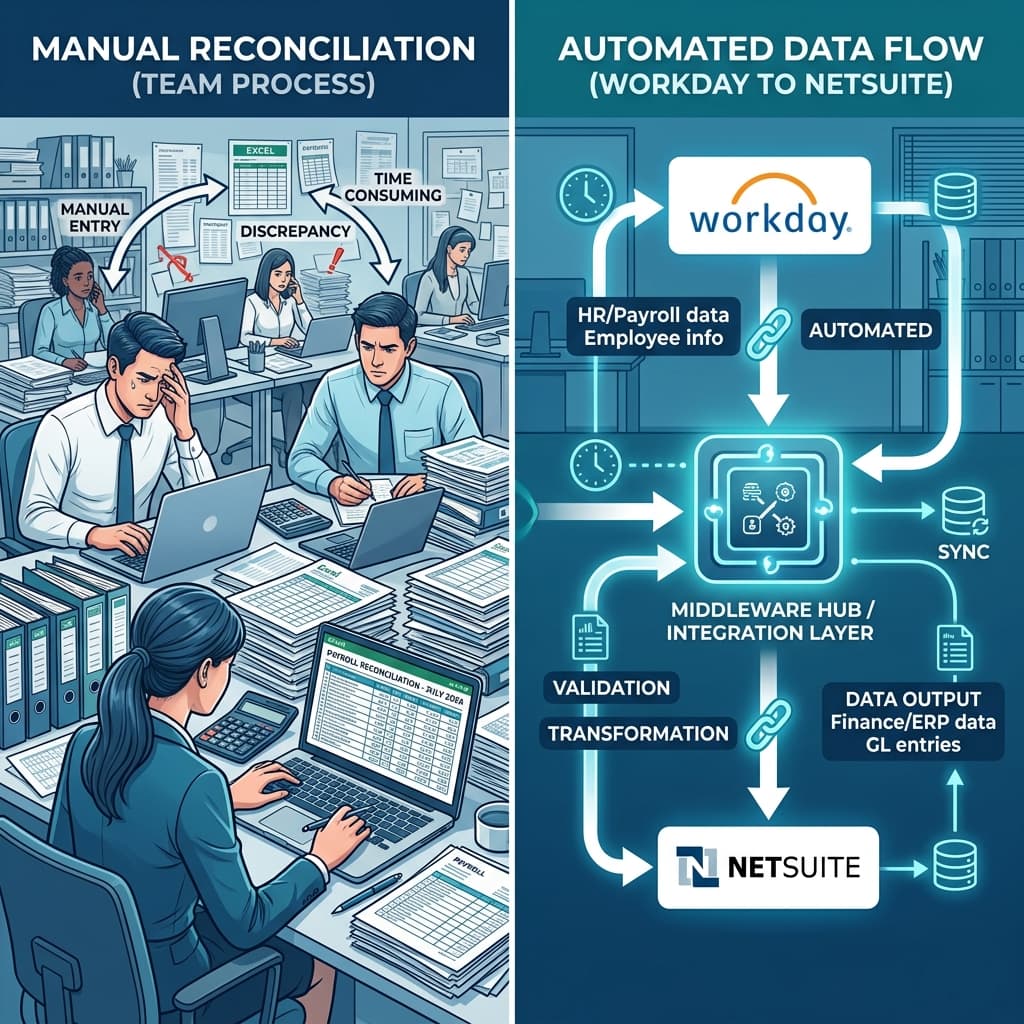
Workday and NetSuite are two of the most capable enterprise platforms available — but running them side by side without integration means your HR data and your financial data are living in separate worlds. Finance waits on HR to close spreadsheets. Payroll journals get hand-keyed into ledgers every month. Headcount changes in Workday don't surface in NetSuite until someone manually reconciles them. Integration solves this — but not automatically, and not cheaply. Workday-to-NetSuite integration projects routinely stretch from 4 to 12 weeks, cost tens of thousands of dollars in year one, and still surprise teams with data-mapping complexity, version-compatibility issues, and post-go-live governance gaps they never saw coming. This guide is for CFOs, HR leaders, and integration architects who need an honest answer to the question: does this integration actually make sense for our organization, and if so, how do we do it right?
What this blog covers
When Workday-to-NetSuite Integration Makes Sense
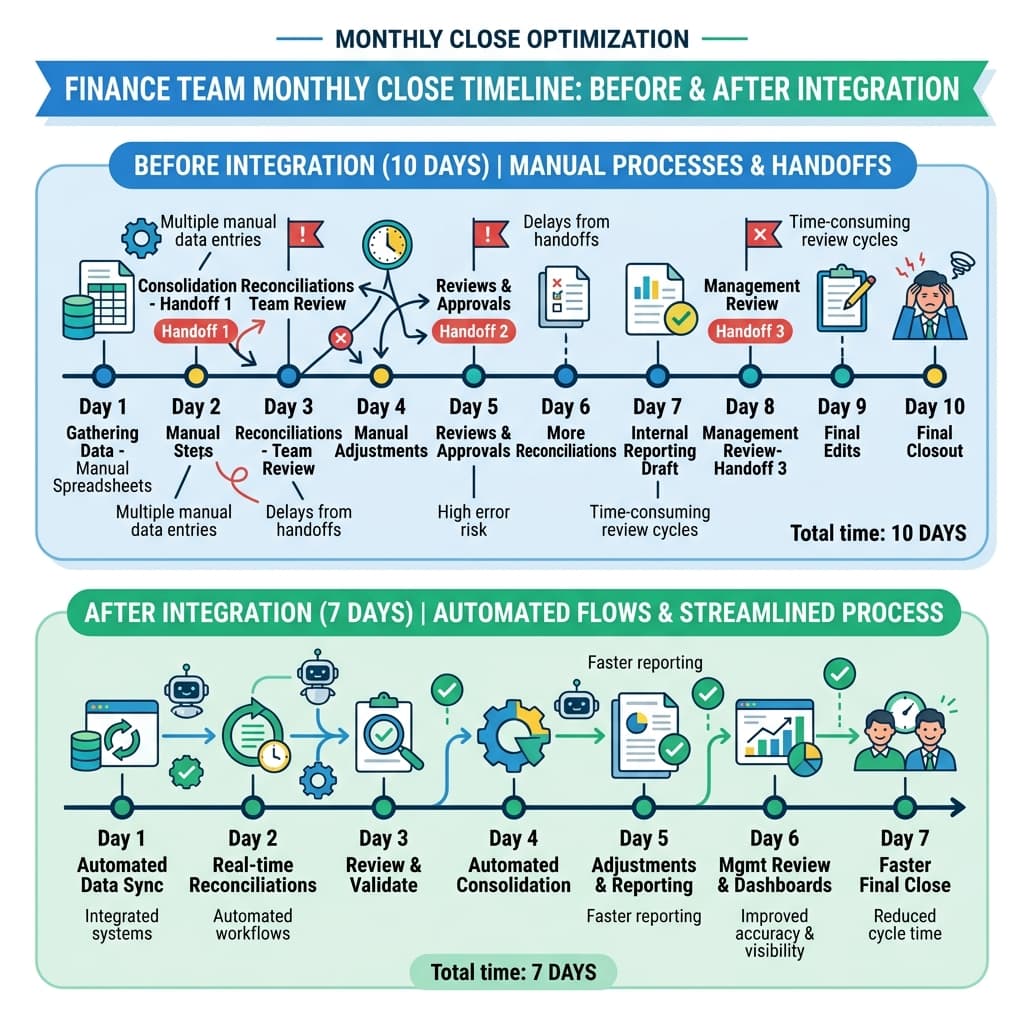
The case for integrating Workday and NetSuite is strongest when both systems are genuinely essential and their data needs to cross over frequently. If your company processes payroll in Workday but manages accounting in NetSuite, the manual handoffs between those two systems are costing you hours every month — and introducing error risk every time a human touches that data. Companies that integrate Workday and NetSuite successfully typically report eliminating 10 to 15 hours of manual data entry per month, cutting two to three days from their monthly close cycle, and improving labor cost forecast accuracy by 20 to 25 percent. Those are meaningful operational gains — and they compound over time as headcount and transaction volume grow. The Business Case Is Real — When the Conditions Are Right
✔ Distinct systems serving distinct functions: If Workday truly owns HR and payroll while NetSuite owns financials and operations, integration creates genuine value. The two systems are doing different things, and the data they produce needs to flow between them in a governed, automated way.
✔ High-volume, recurring data handoffs: Monthly payroll journals, employee master updates, headcount syncs, and cost center assignments are precisely the kind of repeatable, rule-based data flows that integration handles well. If your team is doing these manually today, automation pays for itself quickly.
✔ Finance needs real-time labor cost visibility: Without integration, finance managers are working with lagged data. They can't see current headcount against budget or flag labor cost variances until HR finishes their reporting cycle. Integration closes that gap.
When Workday-to-NetSuite Integration Doesn't Make Sense
Integration is not the right answer in every situation — and the organizations that discover this after spending six figures on a failed project wish someone had told them sooner. The clearest signal that integration is the wrong path: one of your systems could already handle both use cases, but nobody made that decision deliberately. Running two separate ERPs when one could fulfill both HR and finance needs doubles your licensing costs, multiplies your maintenance burden, and creates data consistency problems that integration will not solve — it will just make them harder to find. Signals That Integration May Not Be the Right Answer
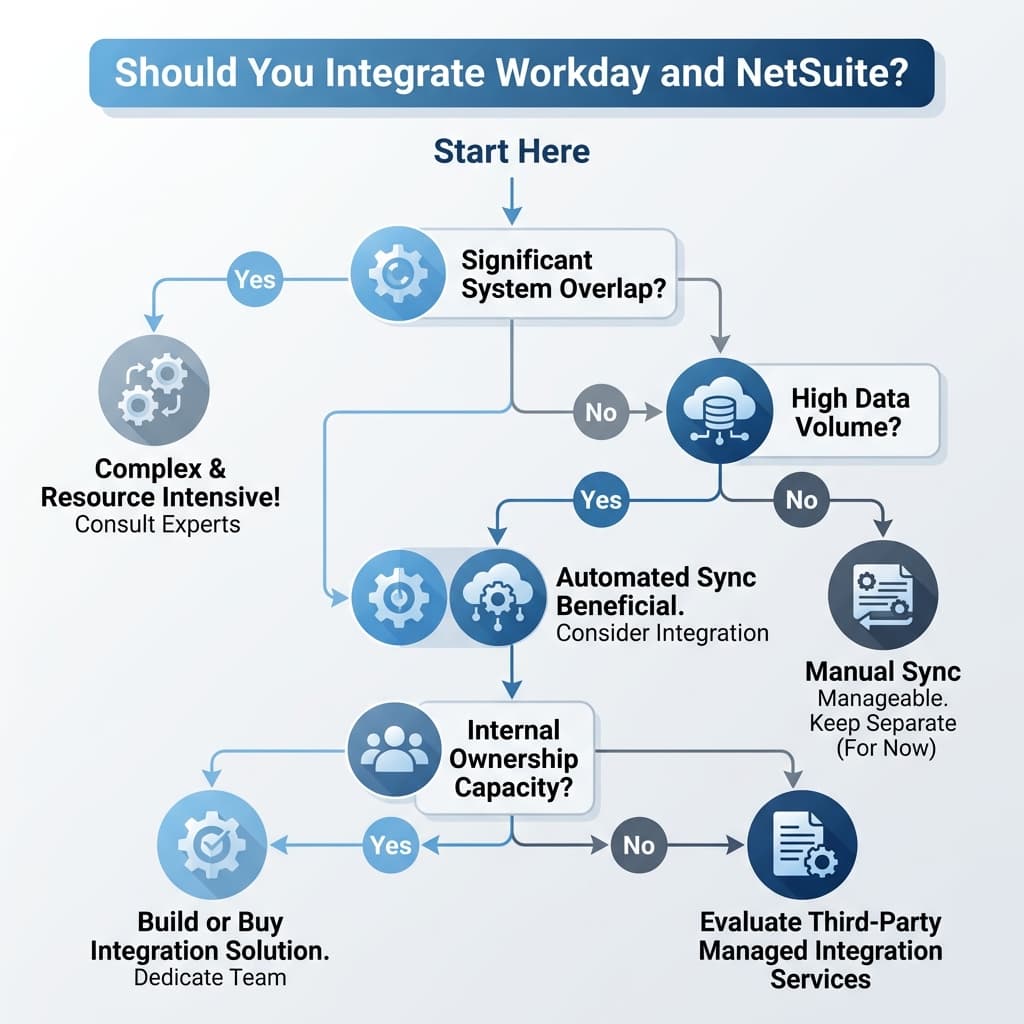
✔ One system can do both jobs: If NetSuite's HR module or Workday's finance capabilities can cover your needs without a second platform, adding an integration layer just creates complexity without adding value. The consolidation path is almost always cheaper and less risky.
✔ No internal resource to own ongoing support: Integration is not a one-time project. It requires 10 to 20 hours of monitoring and maintenance per month after go-live. Teams that build an integration without a named owner for post-launch operations consistently end up with aged data, silent failures, and compliance gaps.
✔ Scope is too narrow to justify the build: If the only data that needs to cross between systems is a single monthly headcount report, an automated integration is disproportionate to the need. A well-governed manual process or scheduled file export may be more practical.
What Organizations Consistently Underestimate
The gap between what teams expect a Workday-NetSuite integration to cost and what it actually costs is not a matter of bad vendor quotes. It is a matter of scope that expands once the real requirements surface.
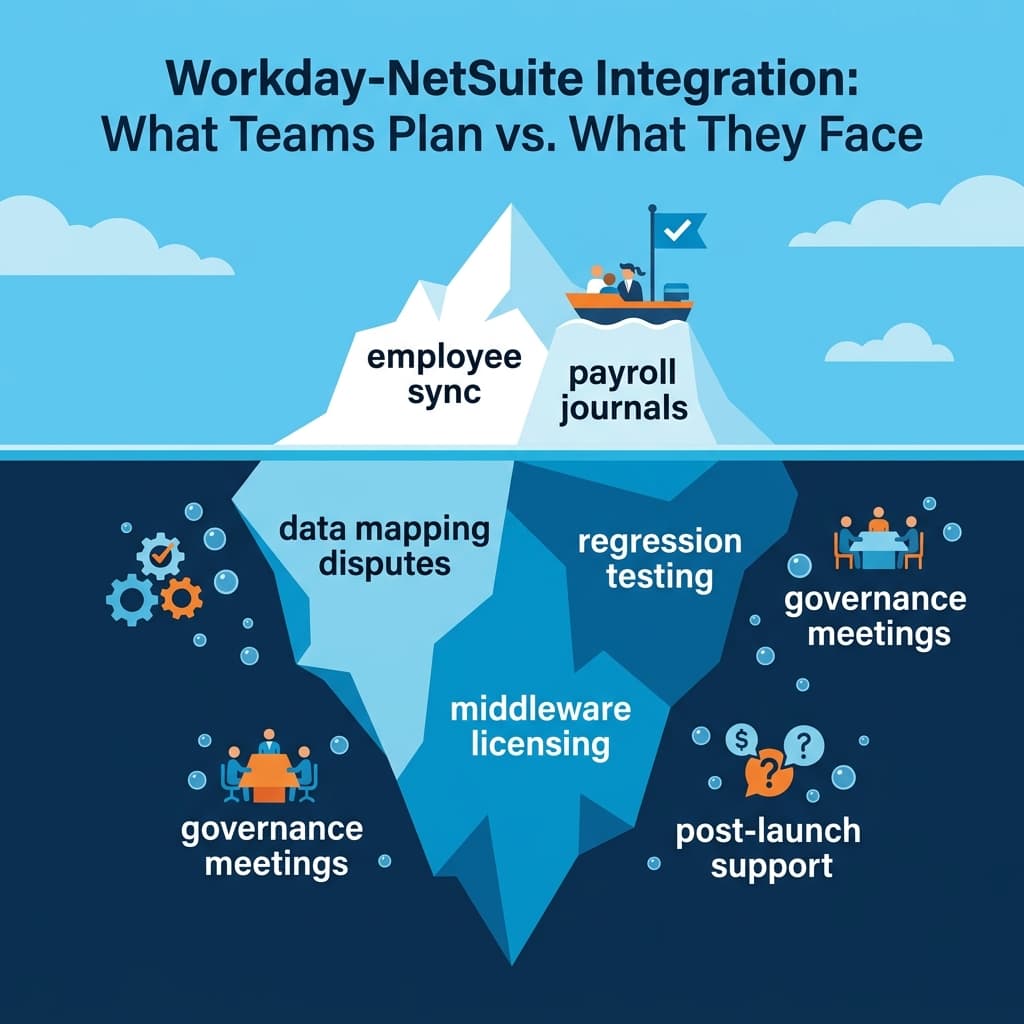
✔ Underestimate #1: The Data Mapping Complexity - Workday's data model is deep and nested. NetSuite's is comparatively flat. Aligning them means flattening or expanding records in ways that don't become obvious until you're actually in the mapping work. Payroll journals that include multiple deductions per employee need to unbundle into separate NetSuite GL lines. Mid-month terminations need to tie to the correct accounting period. Date format mismatches and status code differences can cause entire batches to fail silently.
✔ Underestimate #2: Testing After Every System Update - Workday pushes major updates twice a year. NetSuite releases on its own schedule. Every release from either system has the potential to change something your integration depends on — a field name, an API endpoint, a data schema. Teams that don't build regression testing into their post-launch operations plan discover broken integrations weeks after a release, usually during month-end close when the damage is most visible.
✔ Underestimate #3: Data Ownership Governance - Which system is the source of truth for cost centers? For departments? For employee active status? These questions sound simple until two systems give conflicting answers and the integration doesn't know which one to believe. Master data ownership must be defined explicitly — documented, agreed upon by both HR and finance leadership, and enforced technically — before integration development begins. Resolving these disputes after go-live is significantly more expensive than resolving them before.
✔ Underestimate #4: Ongoing Support Overhead - The integration does not maintain itself. Monitoring failed transactions, reconciling intermittent mismatches, accommodating new business requirements, and coordinating testing around system releases consistently consumes 10 to 20 hours per month. This is not optional overhead — it is the cost of keeping the integration producing accurate data.
Integration Architecture: The Decision That Defines Everything
The most consequential technical decision in a Workday-NetSuite integration is not which fields to map or which API to call. It is the architecture pattern you choose before writing a single line of code. Point-to-Point vs. Middleware: What the Tradeoff Actually Looks Like A point-to-point approach — using Workday's Enterprise Interface Builder to push files directly into NetSuite's CSV import — works for simple, one-off exports. It is fast to build and requires no additional platform licensing. It also fails under exactly the conditions that matter most: when business requirements change, when a Workday update alters a field, when you need error logging that tells you a batch failed before end-of-month close. Middleware platforms — Boomi, Celigo, MuleSoft, and similar iPaaS tools — add licensing cost and a learning curve. They also provide graphical mapping interfaces, built-in error retry logic, transaction logging, and monitoring dashboards. Teams that choose middleware for Workday-NetSuite integrations consistently report better outcomes at the 18-month mark than teams that built point-to-point connections.
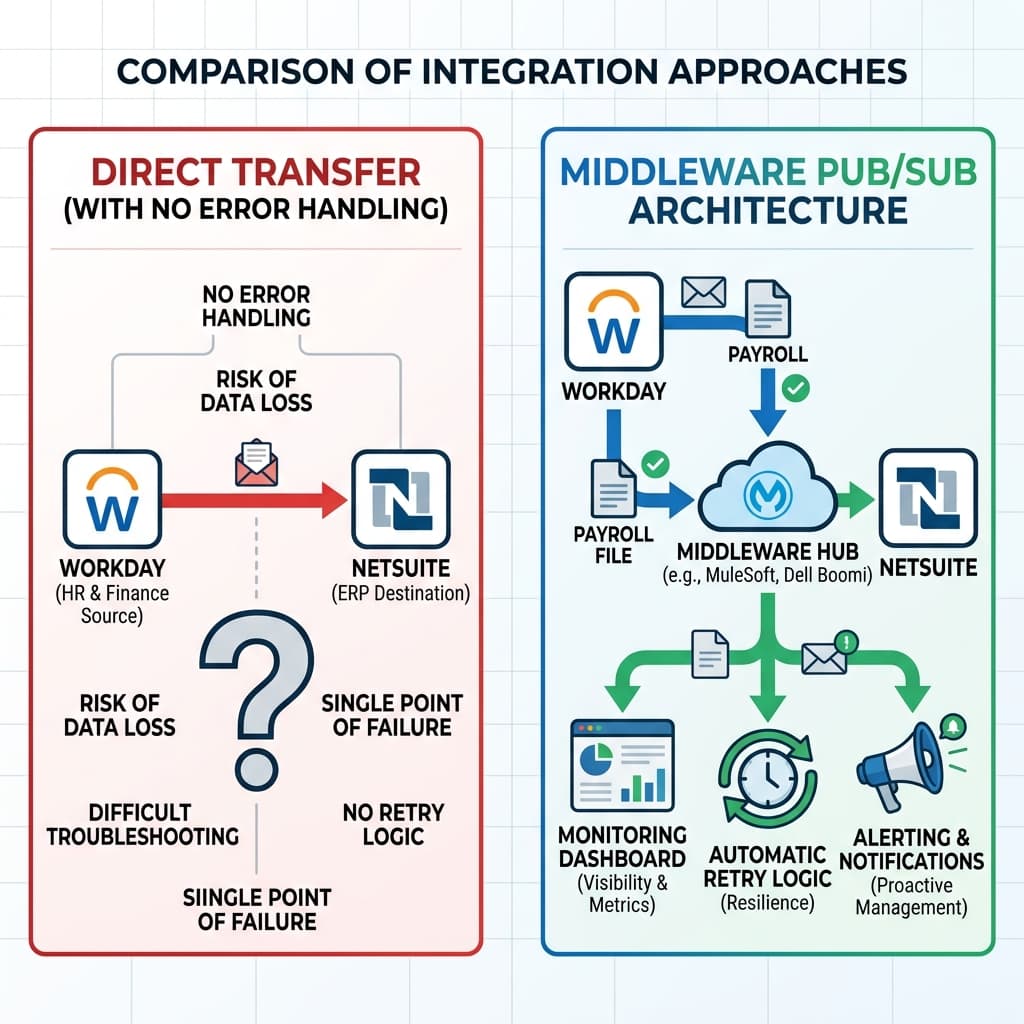
✔ Design error handling from day one: Failed transactions that sit unnoticed in a queue corrupt GL postings and create reconciliation problems. The integration must detect failures, retry recoverable errors automatically, and alert a named owner for errors that require human intervention.
✔ Observability is an operational requirement: Treat the integration layer as a production service. It needs uptime monitoring, transaction success rate tracking, error dashboards, and defined escalation paths — not a reactive 'check it if something breaks' approach.
✔ Publish-subscribe design for scalability: Architectures where Workday events publish to a middleware layer and NetSuite subscribes keep the two systems decoupled. A hire event in Workday propagates to NetSuite within the hour without requiring either system to know the internal structure of the other.
Change Management and Adoption: The Failure Mode Nobody Budgets For
A technically correct Workday-NetSuite integration can still fail to deliver its business case. The mechanism is not broken code — it is users who don't trust the new system, don't understand how their actions in one platform affect the other, or find workarounds that bypass the integration entirely. Finance staff need to understand what the new data fields in NetSuite mean and where they came from. HR staff need to understand what data they own and what happens downstream when they change it. Without that shared understanding, the integration produces data that users don't trust and processes that teams quietly avoid.
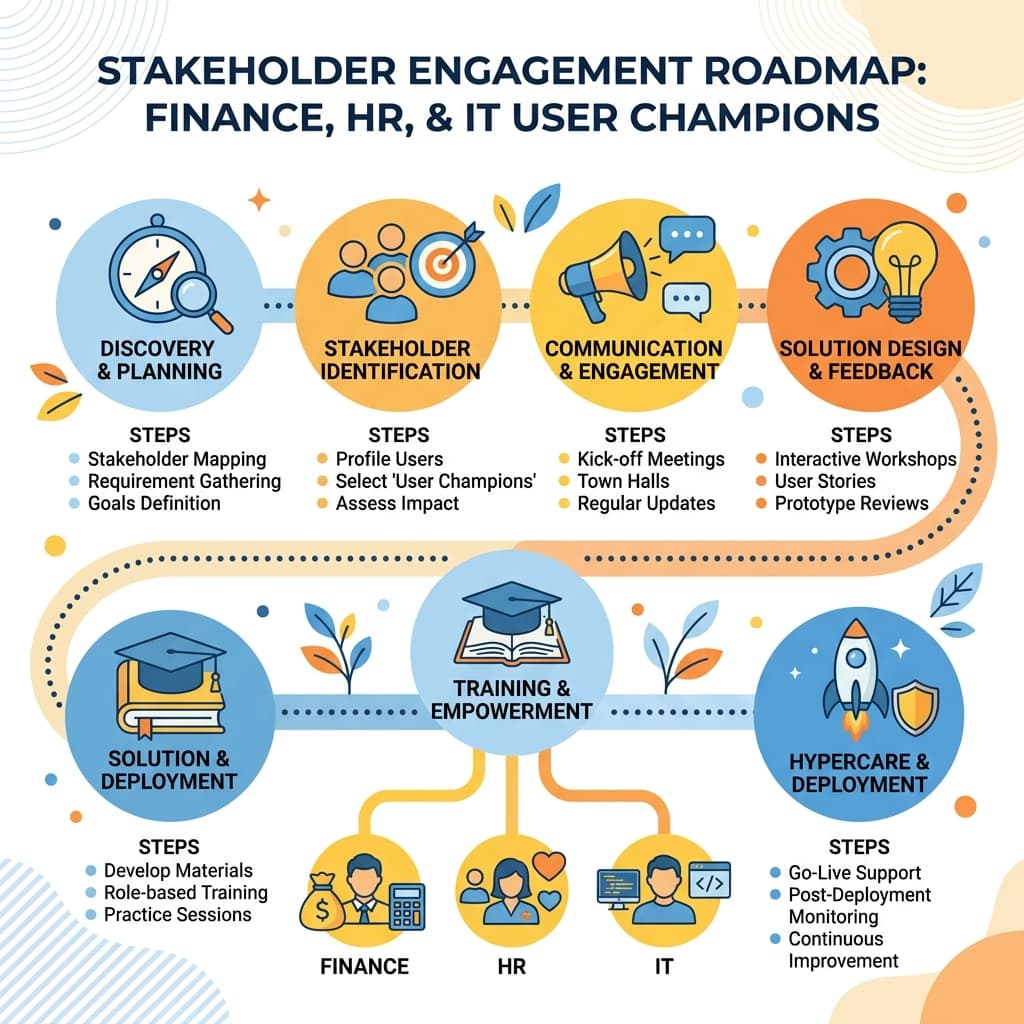
✔ Start change management at project kickoff: Stakeholder engagement, process communication, and user champion identification belong in the design phase — not the week before go-live. Users who shape the system are far more likely to trust and use it.
✔ Training is an ongoing program: Initial training sessions get teams through launch. Role-specific job aids, refresher sessions, and a dedicated hypercare support period in the first four weeks sustain adoption as users encounter real scenarios the training didn't cover.
✔ Build validation reports users can trust: Finance needs to confirm monthly that employee totals match between systems. Building that reconciliation into the integration output — not as a manual spreadsheet exercise — is what converts skeptics into advocates.
Frequently Asked Questions
Integration makes sense when both systems are essential to your operations and their data needs to cross between them regularly. If Workday processes payroll and NetSuite handles financials, the manual handoffs between them — monthly journal entries, headcount reconciliations, cost center updates — are strong candidates for automation. Organizations that integrate under these conditions typically eliminate 10 to 15 hours of monthly manual effort, reduce close cycles by two to three days, and improve labor cost visibility significantly. Integration does not make sense when one system could handle both functions, when you lack internal resources to own ongoing operations, or when the data volume doesn't justify the build.
A basic employee sync typically takes four to six weeks from planning to go-live. Adding payroll journal automation, multi-entity logic, or benefit deduction mapping extends that to eight to twelve weeks. Those timelines assume adequate discovery, data mapping, development, and testing phases. Teams that compress testing or skip data governance work consistently see timelines slip — and they typically discover the reason during their first post-go-live month-end close.
The most common integration scope includes employee master data (IDs, names, departments, locations, active status), payroll journals (gross wages, tax deductions, benefit deductions mapped to specific GL accounts), organizational hierarchies (cost centers, business units, legal entities), and headcount updates tied to budget cycles. Some organizations also integrate benefit elections, contingent worker records, and expense allocations. The recommended approach is to start with the highest-impact, lowest-complexity flows — typically employee master and payroll journals — and expand scope in subsequent phases after the core integration is stable.
Data mapping gaps are the most frequent root cause — fields that don't match exactly between Workday's deep, nested data model and NetSuite's flatter structure require explicit transformation logic that teams routinely underestimate. Master data ownership disputes between HR and finance (which system governs cost centers? departments? active status?) that go unresolved before development begins produce conflicts that surface as integration errors. Inadequate testing that covers happy-path scenarios but misses exception cases, terminated employees, mid-month transfers, and edge cases like employees with multiple assignments. And post-launch support gaps where nobody owns the monitoring, reconciliation, and maintenance that the integration requires every month.
First-year costs for a Workday-NetSuite integration typically land in the low tens of thousands of dollars for a basic employee and payroll sync, when including integration platform licensing and professional services. More complex scope — multi-entity payroll, benefits integration, contingent worker flows — pushes costs significantly higher. Ongoing costs include your middleware platform subscription and internal or managed-services support time, which typically runs 10 to 20 hours per month. The most common budget mistake is planning for the initial build without accounting for ongoing operations — and discovering that ongoing cost in year two.
The answer depends on what data you're moving and how urgently it's needed. Batch integration — nightly or hourly syncs — is simpler to build and appropriate for most data types, including daily payroll uploads and monthly headcount reconciliations. Real-time, event-driven integration is more complex and more expensive, but valuable for scenarios where immediate updates matter: access provisioning tied to hire events, expense approvals linked to current headcount, or compliance workflows that require same-day data. Most organizations use a hybrid: core data flows in scheduled batches, with specific high-priority events triggering near-real-time updates.
The most commonly used middleware platforms for Workday-NetSuite integration include Dell Boomi, Celigo, MuleSoft, and Oracle Integration Cloud. Workday's native tools — the Enterprise Interface Builder and Workday Studio — can handle simpler export scenarios but lack the monitoring, retry logic, and error management that production-grade integration requires. NetSuite's SuiteTalk API and CSV import tools are flexible but need an integration layer to orchestrate them. The right tool depends on your team's existing skills, your organization's middleware ecosystem, and your budget for both licensing and implementation.
Integration ownership works best as a split model: the integration platform team (internal middleware team or a managed services partner) owns the interface layer — monitoring transaction success rates, managing errors, and coordinating release testing. HR and finance own the data definitions — maintaining mapping values when new departments are created, flagging when business rules change, and validating that reconciliation reports match expectations. The breakdown of this split model, where neither side feels fully responsible, is one of the most consistent predictors of integration quality degrading over time. Document ownership explicitly before go-live.
Similar Blogs
See All >
Why Enterprise Organizations Are Choosing Specialized ERP Consulting Firms Over Large Consulting Partners
Enterprise ERP initiatives continue to face high failure rates, budget overruns, and delayed business outcomes. This article explores why organizations are increasingly choosing specialized ERP consulting firms over large consulting partners, how niche expertise improves implementation success, and what leaders should evaluate when selecting an ERP consulting partner.

10 Essential Questions to Ask Before Starting a NetSuite Implementation
Avoid costly ERP mistakes. Discover the 10 critical questions every leader must ask before starting a NetSuite implementation — from scope to data to change management. Enterprise resource planning (ERP) projects like a NetSuite implementation are complex, high-stakes endeavors. Too often, organizations underestimate hidden costs, governance gaps, and integration pitfalls — even when the software itself is sound. At Flowtaris, the difference between a smooth rollout and a costly crisis almost always comes down to early due diligence. Asking the right questions upfront — about business objectives, scope, data ownership, change management, and more — can surface risks before they become disasters and align teams before conflict takes root. This guide covers ten critical questions every CIO, CFO, procurement head, and program manager should answer before kicking off a NetSuite project.

5 Common Coupa Integration Mistakes That Delay Enterprise Projects
Integrating Coupa with your ERP system promises streamlined procurement, automated invoicing, and real-time spend visibility. But for many enterprise teams, the integration becomes the project's biggest bottleneck — not because the technology fails, but because the planning does. At Flowtaris, we have guided numerous Coupa-ERP integrations across NetSuite, SAP, and Workday environments. The same five mistakes appear on project after project. They are avoidable. And catching them early is the difference between a smooth go-live and months of firefighting.